


A compliant diamond product feed must include a stable SKU, the full 4Cs (carat, shape, cut, color, clarity) in controlled vocabulary, measurements in millimeters, certificate lab and report number with a verification URL, origin declaration (Natural or Laboratory-Grown), price with ISO 4217 currency, availability status, crawlable image links, a landing page URL, and valid schema.org Product JSON-LD with an Offer entity. Miss any one of these, and your feed either fails channel validation or surfaces incomplete listings that shoppers and AI agents simply skip.
Quick-check: Is your feed ready to submit?
- [ ] Stable, unique SKU/ID that never changes after assignment
- [ ] Carat formatted as DECIMAL(5,2), e.g., 1.23
- [ ] Shape, cut, color, and clarity in canonical controlled vocabulary
- [ ] Measurements as a millimeter string, e.g., 6.52 x 6.49 x 3.97
- [ ] Certificate lab (GIA, IGI, GCAL, AGS, HRD) + report number + verification URL
- [ ] Origin declared as “Natural” or “Laboratory-Grown” (FTC-compliant)
- [ ] Price matches landing page to the cent; currency in ISO 4217
- [ ] Availability set to a valid schema value (InStock, OutOfStock, PreOrder)
- [ ] Primary image crawlable, 800×800 px minimum, no promotional overlays
- [ ] JSON-LD Product schema with additionalProperty entries for each gemological attribute
Google Merchant Center’s product data specification is the governing channel standard for U.S. shopping feeds. GIA is the most widely recognized certificate authority for establishing grading vocabulary. Jewelcloud automates normalization and distribution so your feed stays compliant without manual rebuilds.
Pro Tip: Run this quick-check on a sample of 10 SKUs before touching your full catalog. Errors cluster, so a small sample usually reveals the same normalization gaps that affect thousands of records.
Key Takeaways
A compliant diamond product feed requires canonical 4Cs vocabulary, structured certificate data, exact price parity, and daily monitoring for price-sensitive inventory.
| Point | Details |
|---|---|
| Canonical 4Cs vocabulary | Use controlled values (e.g., “Excellent” not “EX”) and DECIMAL(5,2) for carat to pass schema matching and channel validation. |
| Structured certificate data | Include lab code, report number, and a verification URL as feed fields and JSON-LD additionalProperty entries, not just a PDF link. |
| Exact price parity | Feed price must match the landing page to the cent; automate a nightly parity check across a sample of active SKUs. |
| Daily monitoring for volatile SKUs | Price-sensitive inventory needs at least daily feed refreshes and alert thresholds for disapprovals and blank critical fields. |
| Jewelcloud automates normalization | Jewelcloud maps, normalizes, and distributes diamond feeds to channels with built-in validation and monitoring dashboards. |
Table of Contents
- What does a diamond product feed requirements checklist cover?
- How do you map diamond attributes to Google Merchant Center?
- What feed formats and delivery schedules work best for diamonds?
- How should you handle pricing rules and visibility modes in your feed?
- What image and certificate standards does your feed need to meet?
- How do you validate and monitor a diamond feed after launch?
- Step-by-step pre-launch and launch checklist
- How Jewelcloud handles diamond feed normalization and distribution
- Jewelcloud makes your diamond feed channel-ready
- What most diamond feed guides get wrong
- Sources
What does a diamond product feed requirements checklist cover?
A complete diamond product feed requirements checklist covers every attribute a channel needs to index, price, and display your inventory correctly. The table below maps each attribute to its purpose, accepted format, an example value, and the validation check you should run.
| Attribute | Why It Matters | Required Format / Allowed Values | Example Value | Validation Check |
|---|---|---|---|---|
| id (SKU) | Stable identifier for inventory reconciliation | Alphanumeric string, no spaces or special characters | DIA-GIA-2486952873 | Never changes after assignment; reconcile against ERP daily |
| title | Primary display string in search results | “Shape + Carat + Cut + Color + Clarity + Lab + Certificate” | “Round 1.23ct Excellent D VS1 GIA 2486952873” | Max 150 chars; includes all 4Cs |
| description | Supports long-tail search and AI citation | Plain text, 500–5,000 chars, no HTML | “GIA-certified round brilliant…” | No keyword stuffing; includes measurements and origin |
| link | Landing page URL | Canonical HTTPS URL | https://yourstore.com/diamonds/DIA-GIA-2486952873 | Returns HTTP 200; price on page matches feed |
| image_link | Primary product image | HTTPS URL, JPEG or PNG, ≥800×800 px | https://cdn.yourstore.com/dia-2486952873.jpg | Returns HTTP 200; correct MIME type; no watermarks |
| price | Retail price | Decimal with two places + currency code | 4850.00 | Matches landing page to the cent |
| priceCurrency | ISO 4217 currency code | Three-letter ISO 4217 code | USD | Must match price field currency |
| availability | Stock status | InStock, OutOfStock, PreOrder, Discontinued | InStock | Matches live inventory; synced at least daily |
| condition | Product condition | new, refurbished, used | new | Diamonds are always “new” unless estate |
| carat | Diamond weight | DECIMAL(5,2) numeric string | 1.23 | No trailing zeros beyond two decimal places |
| shape | Diamond shape | Round, Princess, Oval, Cushion, Emerald, Pear, Radiant, Asscher, Marquise, Heart | Round | Controlled vocabulary only; no abbreviations |
| cut | Cut grade | Excellent, Very Good, Good, Fair, Poor (GIA five-grade scale) | Excellent | Applies to Round Brilliant only; fancy shapes use Polish/Symmetry |
| color | Color grade | D, E, F, G, H, I, J, K, L, M, N–Z | D | Single letter; no ranges in a single record |
| clarity | Clarity grade | FL, IF, VVS1, VVS2, VS1, VS2, SI1, SI2, I1, I2, I3 | VS1 | Canonical abbreviation; no alternate spellings |
| measurements | Physical dimensions | “L x W x D mm” string | 6.52 x 6.49 x 3.97 | Three numeric values separated by " x "; unit is mm |
| lab | Grading laboratory | GIA, IGI, GCAL, AGS, HRD, EGL | GIA | Canonical abbreviation; no full names or variants |
| report_number | Certificate ID | Numeric string, no dashes | 2486952873 | Matches certificate PDF; unique per stone |
| certificate_url | Verification link | HTTPS URL to lab’s report-check page | https://www.gia.edu/report-check?reportno=2486952873 | Returns HTTP 200; report number in URL matches field |
| origin | Natural vs lab-grown | Natural, Laboratory-Grown | Natural | FTC-compliant term; never “synthetic” or “fake” |
| fluorescence | Fluorescence intensity | None, Faint, Medium, Strong, Very Strong | None | Explicit “None” required; never leave blank |
Normalization is where most feeds break. Feed normalization failures quietly corrupt schema matching and agentic visibility when values like “EX” instead of “Excellent” or “Lab Grown” instead of “Laboratory-Grown” slip through. Canonical case matters. Numeric precision matters. And explicit strings for absent data (“None” for fluorescence, “Not Graded” for ungraded attributes) matter more than most dealers realize.
- Use “Not Graded” when a grading lab did not assess the attribute.
- Use “None” when the attribute was assessed and the result is absence (e.g., no fluorescence).
- Use “Unconfirmed” only as a temporary enrichment flag, never in a published feed.
Pro Tip: Pull a stratified 100-record sample from your feed sources and count how many distinct values appear for “cut,” “fluorescence,” and “origin.” More than the expected controlled-vocabulary count means you have a normalization gap to close before submission.
How do you map diamond attributes to Google Merchant Center?
Google Merchant Center requires core product attributes plus strict jewelry-specific disclosures. Material type, purity, and gemstone origin (natural vs. lab-grown) are mandatory. Missing any of them risks policy violations and listing suspension.
| Attribute | Why It Matters | Required Format / Channel Rule | Example Value | Validation Check |
|---|---|---|---|---|
| identifier_exists | Required for custom/one-of-a-kind pieces | “no” when no GTIN/MPN exists | no | Set correctly for bespoke stones; do not omit |
| material | Metal and gem disclosure | Free text; must include metal type, purity, and gemstone | “White Gold, Natural Diamond” | Required by GMC jewelry policy |
| gem_disclosure | Lab-grown disclosure | “Laboratory-Grown Diamond” or “Natural Diamond” | Natural Diamond | Mandatory per GMC and FTC rules |
| product_detail | Structured gemological data | Attribute name + value pairs | Cut: Excellent | Use for 4Cs when no custom attribute exists |
| shipping | Shipping details | Carrier, service, price | UPS Ground: $0.00 | Required for Shopping ads eligibility |
| custom_label_0–4 | Bidding segmentation | Free text; use for margin tier, carat band, or origin | LGD-Under-1ct | Improves ROAS by enabling bid adjustments |
Google enforces stricter jewelry listing rules than most other product categories. Accurate material and purity disclosure, mandatory natural vs. lab-grown declaration, and correct identifier handling for custom pieces are all enforced. Non-disclosure can lead to account suspension, not just individual listing disapprovals.
Key compliance items for Google Merchant Center:
- Declare lab-grown diamonds explicitly in both the title and the
gem_disclosureattribute. - Use
identifier_exists: nofor one-of-a-kind stones with no GTIN or MPN. - Images must show the actual stone or setting, not a stock render, and must be free of promotional text overlays.
- Landing-page price must match the feed price to the cent at the time of crawl.
-
product_detailentries for the 4Cs improve eligibility for Google’s jewelry filters.
For schema mapping, express gemological attributes as schema.org additionalProperty PropertyValue objects so both crawlers and AI agents can parse the 4Cs and certificate report numbers reliably. A complete Offer entity (price, priceCurrency, availability, priceValidUntil, seller, shippingDetails) is required for rich results eligibility. Map each JSON-LD additionalProperty to the corresponding Merchant Center product_detail field during feed generation so both channels receive consistent data from a single source of truth.
For marketplace and paid shopping platforms beyond Google, the same canonical attribute set applies. Use generic custom labels for bid segmentation (carat band, origin, margin tier) rather than channel-specific fields, so the same label logic ports across platforms without rebuilding.
What feed formats and delivery schedules work best for diamonds?
Acceptable formats are CSV/TSV, XML, and API endpoints (including Google Content API for Shopping). UTF-8 encoding is required for all flat files. UTF-8 handles special characters in descriptions and certificate URLs without corruption.
Sample CSV header:
id,title,description,link,image_link,additional_image_link,price,priceCurrency,availability,condition,carat,shape,cut,color,clarity,measurements,table_pct,depth_pct,polish,symmetry,fluorescence,lab,report_number,certificate_url,origin,shipping,custom_label_0
Sample row:
DIA-GIA-2486952873,"Round 1.23ct Excellent D VS1 GIA 2486952873","GIA-certified round brilliant, natural diamond, 1.23 carats, D color, VS1 clarity, Excellent cut.",https://yourstore.com/diamonds/DIA-GIA-2486952873,https://cdn.yourstore.com/dia-2486952873.jpg,https://cdn.yourstore.com/dia-2486952873-side.jpg,4850.00,USD,InStock,new,1.23,Round,Excellent,D,VS1,"6.52 x 6.49 x 3.97",57.0,61.8,Excellent,Excellent,None,GIA,2486952873,https://www.gia.edu/report-check?reportno=2486952873,Natural,"UPS Ground:0.00 USD",LGD-No
Delivery cadence should match your inventory’s price volatility. Price-sensitive or high-turn SKUs warrant daily or even hourly refreshes. A stable catalog of estate or custom pieces can run on a weekly schedule. Use ISO 8601 date formats with explicit timezone references for all priceValidUntil and scheduling fields.

| Inventory Type | Recommended Cadence | Delivery Method |
|---|---|---|
| Spot-priced melee / high-turn | Hourly or every 4 hours | Content API or scheduled XML |
| Standard bridal / solitaire inventory | Daily | Scheduled CSV or XML |
| Estate, custom, or made-to-order | Weekly | Scheduled CSV |
Version control your feed files with date-stamped filenames (e.g., diamond-feed-20260601.csv) and keep the previous two versions for rollback. Store them in a versioned bucket or repository, not just a single overwritten file.
- Escape commas and quotes in CSV fields using double-quote wrapping per RFC 4180.
- Field length limits: title ≤150 characters, description ≤5,000 characters, URLs ≤2,000 characters.
- Multi-value fields (additional images): use pipe separation in CSV (
url1|url2) or multiple XML nodes. - Variant SKUs for the same stone in different settings use
item_group_idto group them; each variant gets its own stableid.
Pro Tip: Prefer the Content API over flat files for any inventory that changes price daily. Flat-file processing windows can lag by hours; the API pushes updates in near real time, which matters when metal spot prices shift your diamond pricing mid-day.
How should you handle pricing rules and visibility modes in your feed?
Price must match the landing page to the cent at the time Google crawls it. Currency must be a valid ISO 4217 three-letter code (USD for U.S. listings). Any mismatch between feed price and page price is one of the most common causes of Google Shopping disapprovals.
For promotions, sale_price and sale_price_effective_date must follow the format YYYY-MM-DDThh:mm:ss+HH:MM/YYYY-MM-DDThh:mm:ss+HH:MM. A missing end date or a malformed timezone offset will cause the sale price to be ignored or the listing to be disapproved.
Visibility modes map into feed attributes differently depending on the channel:
-
Public listings: Standard
availability: InStock, full price populated, landing page publicly accessible. -
Trade-only listings: Set
availability: OutOfStockor exclude from the public feed entirely; use a separate trade feed with access-controlled landing pages. Never submit a trade-only URL to a public shopping channel. - Quote-only listings: Omit from shopping feeds entirely. A “call for price” landing page will fail Google’s price-match requirement. Use these SKUs in your B2B catalog only.
-
Hidden/inactive listings: Set
availability: Discontinuedor remove the record from the feed. Leaving stale records active inflates disapproval rates.
Variant pricing for metal upgrades or customizations requires a separate id per variant with its own price and item_group_id linking it to the parent stone. Dynamic pricing driven by spot metal prices needs a synchronization cadence that matches your repricing frequency. Use a rolling priceValidUntil window (90 days is a practical standard) so the Offer entity in your JSON-LD stays valid without requiring a full schema rebuild on every price change.
Common failure modes and quick fixes:
- Price mismatch: Automate a nightly price-parity check that compares feed price to scraped landing-page price for a sample of 50 SKUs.
-
Hidden fees on landing page: Shipping and handling must be declared in
shippingDetails, not added at checkout. Undisclosed fees trigger policy violations. -
Variant landing-page mismatch: Each variant’s
linkmust resolve to the specific variant page, not the parent product page. -
Made-to-order fulfilment: Use
availability: PreOrderand populateshippingDetailswith a realistic lead time. “Ships in 3–4 weeks” expressed inshippingDetailssatisfies Google’s fulfilment transparency requirement.
Pro Tip: Set up an automated alert that fires when any SKU’s feed price deviates from its landing-page price by more than $0.01. A spreadsheet formula pulling from your feed export and a simple page scrape can catch this before Google does.
What image and certificate standards does your feed need to meet?
The primary image must be crawlable, at least 800×800 pixels, free of promotional overlays or watermarks, and served over HTTPS. For diamonds, the certificate must appear as a structured field in both the feed and JSON-LD, not just as a PDF attachment.
Image checklist:
- [ ] Primary image: white or neutral background, stone centered, ≥800×800 px
- [ ] Side/profile angle: shows depth and proportions
- [ ] Macro close-up: table and facets visible
- [ ] On-model or setting image: context for scale and wearability
- [ ] All image URLs return HTTP 200 with correct MIME type (image/jpeg or image/png)
- [ ] No text overlays, borders, or promotional badges on any image
For certificate handling, keep the PDF as a downloadable attachment on the product page, but the feed and JSON-LD must carry the structured fields: lab, report_number, and certificate_url pointing to the lab’s own verification page. For GIA certificates, the verification URL format is https://www.gia.edu/report-check?reportno=[REPORT_NUMBER]. This structured approach lets AI agents and crawlers parse the certificate data directly rather than relying on a PDF they cannot read.
Implement Product JSON-LD with additionalProperty entries for each gemological attribute and a complete Offer entity including priceValidUntil to be eligible for rich results and AI citation. A rolling 90-day priceValidUntil window keeps the Offer entity valid without constant manual updates.
For video and 3D assets: MP4 is the standard video format for product feeds. If you use 3D models for product visualization, validate glTF assets with the Khronos glTF-Validator before publishing to catch packaging errors that break product viewers.
Pro Tip: Label any renders or AI-generated images using IPTC CV vocabulary tags (e.g., trainedAlgorithmicMedia or compositeSynthetic) in the image metadata. This prevents channel disapprovals for misrepresentation and signals transparency to crawlers.
How do you validate and monitor a diamond feed after launch?
Run a three-stage validation before any release: schema/field-level checks, channel processing checks, and landing-page parity checks. Automate post-release monitoring for price, availability, and disapprovals so data drift gets caught within hours, not weeks.
Pre-launch validation checklist:
- Stable ID reconciliation: confirm every
idin the feed matches the ERP or inventory system with no duplicates. - Vocabulary validation: check that cut, color, clarity, shape, fluorescence, and origin values all fall within their controlled vocabularies.
- Numeric precision: verify carat is DECIMAL(5,2) and no records carry more than two decimal places.
- Certificate URL verification: spot-check 20 certificate URLs to confirm they return HTTP 200 and the report number in the URL matches the
report_numberfield. - Image URL checks: confirm all
image_linkandadditional_image_linkURLs return HTTP 200 with a valid image MIME type. - Landing-page parity: load 10 random SKU landing pages and confirm price, availability, and title match the feed record exactly.
- Schema validation: run the JSON-LD through Google’s Rich Results Test for a sample of PDPs.
Post-launch monitoring playbook:
- Check Merchant Center diagnostics daily for the first two weeks after launch.
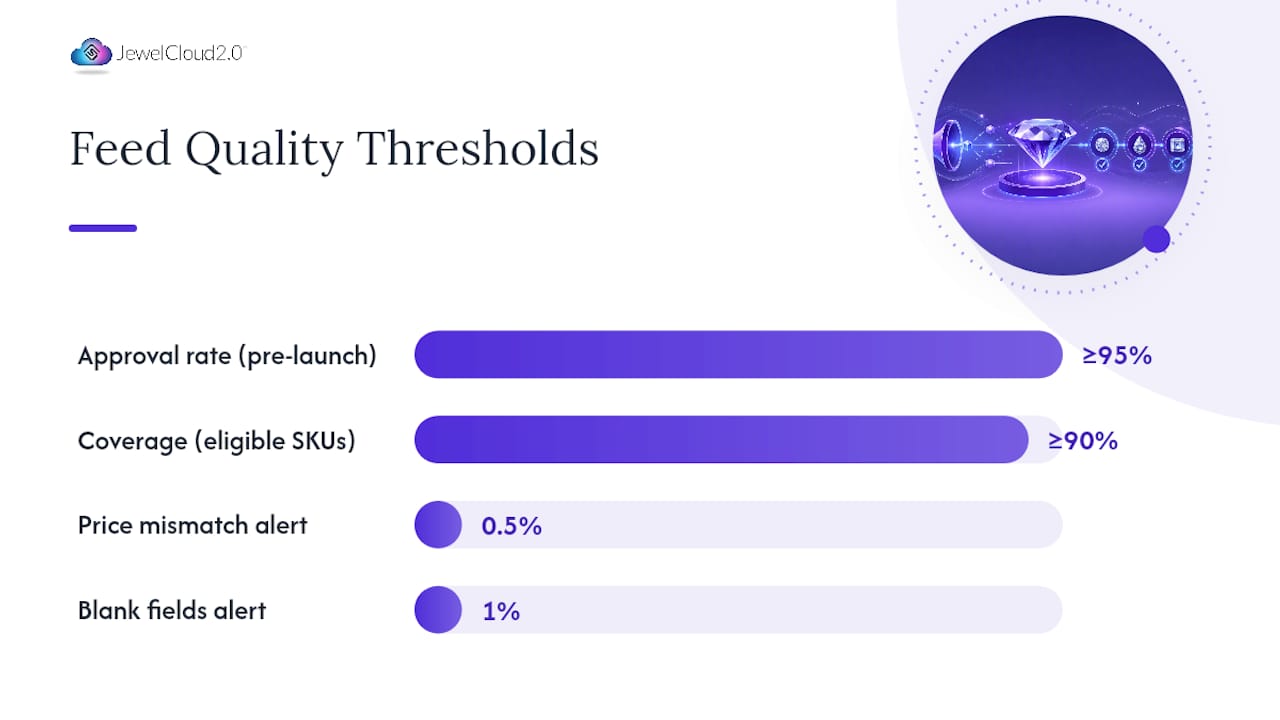
- Set email or Slack alerts for: any new disapprovals, price mismatch rate above 0.5% of active SKUs, and blank fluorescence or origin fields above 1% of the feed.
- Review feed processing reports after every scheduled submission to catch partial upload failures.
- Escalate critical errors (image disapprovals, price policy violations) to the feed engineer within 24 hours.
A 23-point product feed audit framework identifies title structure and GTINs/identifiers as the highest-leverage items for impressions and ROAS. Prioritize these in your first audit pass before moving to conversion signals like custom labels and promotional pricing.
Suggested acceptance metrics for go/no-go decisions:
- Approval rate: ≥95% of submitted SKUs approved before launch.
- Coverage: ≥90% of eligible SKUs present in the feed.
- Critical errors (price mismatch, image disapproval, policy violation): 0 at launch.
- Post-deploy regression: run the same 10-SKU parity check within 24 hours of each feed update.
Pro Tip: Keep your previous working feed file in version control. If a new submission triggers a spike in disapprovals, you can roll back to the last clean version within minutes rather than rebuilding from scratch.
Step-by-step pre-launch and launch checklist
Follow this sequence from feed contract through 30 days post-launch. Assign an owner to each step and timebox it so nothing drifts.
- Record the feed contract (Data Steward, Day 1): Document source systems, field mappings, delivery schedule, and channel targets. A structured feed contract prevents scope creep and ownership gaps.
- Audit source data (Data Steward, Days 1–3): Pull a 100-record stratified sample. Count vocabulary variants for cut, fluorescence, and origin. Flag enrichment gaps.
- Map and normalize fields (Feed Engineer, Days 2–5): Build the canonical mapping table. Apply DECIMAL(5,2) for carat, controlled vocabulary for all 4Cs, and FTC-compliant origin strings.
-
Implement schema (Feed Engineer, Days 3–6): Add Product JSON-LD with
additionalPropertyarrays and a complete Offer entity to all PDPs. - Run sample export (Feed Engineer, Day 6): Generate a 50-record test feed. Validate headers, encoding, and field values against the checklist in Section 2.
- Pre-release QA (Merchant Center Admin + Feed Engineer, Days 7–8): Upload the test feed to a Merchant Center test account. Review diagnostics. Resolve all critical errors before proceeding.
- Go/no-go review (All owners, Day 9): Approval rate ≥95%, zero critical errors, price parity confirmed, image checks passed. If any criterion fails, return to Step 5.
- Submit full feed (Merchant Center Admin, Day 10): Upload or activate API delivery. Confirm processing completes without errors.
- Monitor diagnostics (Marketplace Manager, Days 10–24): Daily Merchant Center checks. Alert thresholds active. Escalate any policy violations within 24 hours.
- 30-day performance review (All owners, Day 40): Measure approval rate, coverage, impressions recovered, and ROAS lift. Document normalization gaps for the next sprint.
Go/no-go criteria:
- Approval rate ≥95%
- Zero price-mismatch errors
- Zero image policy violations
- All certificate URLs returning HTTP 200
- Origin declaration present on 100% of records
A practical feed implementation checklist confirms the pre-release and measurement steps that keep this sequence on track.
How Jewelcloud handles diamond feed normalization and distribution
Jewelcloud standardizes and automates the normalization, distribution, and monitoring work that this checklist describes. Rather than building and maintaining a custom mapping pipeline, diamond dealers and retailers can upload their inventory to Jewelcloud and let the platform handle the field-level work.
What Jewelcloud does for your feed:
- Normalization mapping for all 4Cs, lab abbreviations, carat precision, fluorescence, and origin declarations against canonical controlled vocabularies
- Certificate URL wiring: report numbers are linked to lab verification pages automatically
- Crawlable JSON-LD generation with
additionalPropertyarrays for gemological attributes and a complete Offer entity - Automated price-parity checks between feed values and landing-page prices
- Scheduled feed delivery to channels on a cadence matched to your inventory’s price volatility
- Merchant Center integration with processing diagnostics surfaced in a monitoring dashboard
The typical customer flow: upload your diamond inventory, map your source fields to Jewelcloud’s canonical schema, run the built-in validation, and distribute to connected channels. Monitoring dashboards flag disapprovals and data drift so your team responds to alerts rather than hunting for errors manually.
DiamondLink® extends this to virtual inventory, letting retailers showcase diamonds they do not physically stock while the feed data stays current and compliant. For dealers evaluating the full platform, the Jewelcloud product feed page covers mapping templates, integration options, and channel connections in detail.
Pro Tip: Use Jewelcloud’s normalization mapping as your canonical vocabulary reference even before you go live. Aligning your source data to the platform’s controlled vocabularies during the enrichment phase means fewer corrections after submission.
Jewelcloud makes your diamond feed channel-ready
Getting a diamond feed to pass Google Merchant Center validation, display correctly across marketplaces, and stay current as prices shift is a real operational lift. Jewelcloud is built specifically for that job.

For diamond dealers and ecommerce managers, Jewelcloud delivers structured, normalized product data that maps directly to channel requirements without manual rebuilds. Your 4Cs are in canonical format. Your certificate URLs are wired. Your Offer entity is schema-compliant. And when prices change, the feed updates on the schedule your inventory demands, not whenever someone remembers to export a new file.
Explore diamond vendor benefits to see how Jewelcloud handles the full pipeline from upload to distribution, or visit the Jewelcloud product feed page to review integration options and get started.
What most diamond feed guides get wrong
Most diamond product feed guides stop at “include the 4Cs.” That is the floor, not the ceiling, and treating it as a complete answer is where most dealers run into trouble six months after launch.
The real problem is not missing fields. It is inconsistent fields. Channel validators do not catch vocabulary drift. You have to catch it yourself, which means building a normalization audit into your workflow before submission, not after disapprovals start appearing.
The second thing guides understate is the origin declaration. The FTC’s guidance on lab-grown diamond disclosure is not optional language. “Laboratory-Grown” is the required term. “Synthetic,” “cultured,” or any other variant creates compliance exposure, and Google’s jewelry policy enforces this at the listing level. Getting it wrong is not a minor data quality issue.
What I’d prioritize first: fix your normalization pipeline before you worry about image angles or custom label strategy. A feed with perfect images and broken cut-grade vocabulary will underperform a feed with good images and clean canonical data every time. The vocabulary is the foundation everything else sits on.
Sources
- The Data Problem Nobody Warned You About: How Feed Normalisation Failures Are Quietly Destroying Your Diamond Store’s Schema, Rankings, and Agentic Visibility
- Jewelry Google Merchant Center Compliance Guide (2026) | GMC Checker
- Product Feed Audit Checklist: 23 Key Data Points | MagicFeedPro Blog